
Guide5 of 6
Keeping up
This page explains the numbers you see day to day: your child's day screen, chore notifications, and the daily report. It shows where the minutes came from before the family argument starts doing its own math.
The day screen is about one day
You set You give for each child. Those are guaranteed minutes for that day. On your child's day, the same setting reads You give 60 min when you have allowed 60 minutes.
If you set You give to 60 minutes, your child can earn 60 more minutes that day, but not more than that. The day never goes past Daily max, and saved-up minutes never raise it.
- You give
- 60 min
- Can earn
- 60 min
- Daily max
- 120 min
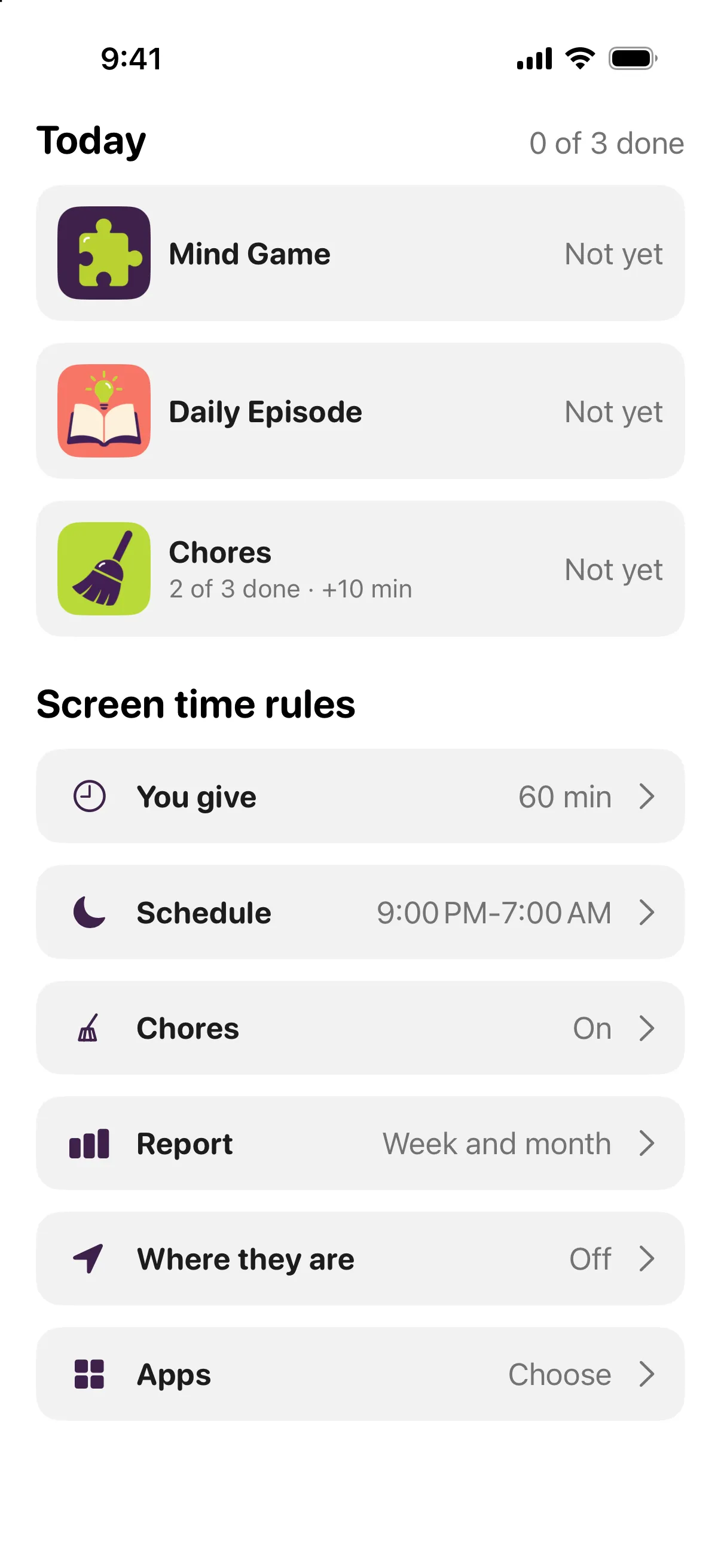
Where earned minutes come from
There are three ways to earn screen time: the mind game, the daily episode, and chores. When all three are available, each is worth about one third of what can be earned that day, so doing all three earns the whole amount.
With 60 minutes allowed, your child can earn 20 minutes from the puzzle, 20 minutes from the episode, and 20 minutes from chores. If one of those ways is not available that day, for example there are no chores at all, the available minutes are divided between the remaining two.
- Mind game solved
- +20 min
- Episode passed
- +20 min
- Chores completed
- +20 min
- Earned today
- 60 min
How the mind game number is decided
Your child gets one puzzle a day, three tries, and 30 minutes of play. If they solve it, they earn that day's puzzle minutes. If they use the tries or the 30 minutes without solving it, they earn no minutes from the puzzle that day.
The puzzle type rotates through fourteen kinds. Difficulty goes up a step after a fully solved three-day block and down a step after three failed days in a row, with the age group limiting how high and how low it goes.
How the episode number is decided
Your child gets one episode a day for their age group, 7‑8 or 9‑11. It has four or five short parts, each with a picture and narration, and the child can read or listen.
At 9‑11 the test has ten questions, one attempt a day, and six right answers are needed to pass (at 7‑8 it is eight questions and five right). During the test, the text and audio are closed. If your child passes, they earn the episode minutes. If they fail, they get no minutes for that episode, and a new episode arrives tomorrow.
Every question is explained afterward either way, with the right answer named and the part of the text it came from.
- Questions
- 10
- Needed to pass
- 6 right
- Attempts
- 1 a day
How chore minutes are decided
A child can have up to three chores. Each chore has a name, an optional note, and the time you expect it to take, from 1 to 240 minutes.
The day's chore minutes are split between today's chores in proportion to the time you set for each one. A longer job is worth more. Doing everything on the list earns all of the chore minutes for that day.
The minutes a chore is worth are fixed when your child starts it. If you change the list while they work, they still get what was promised. Taking longer is fine and changes nothing, which is generous to both slow socks and mysterious dishwasher delays.
- Feed cat, expected 10 min
- 5 min
- Dishes, expected 30 min
- 15 min
- Total chore minutes
- 20 min
What Used means
Used is the screen time spent in limited apps. You choose which apps are limited; ticked means limited, and apps that are not ticked stay open. On Android, a new app starts out limited until you untick it.
Minutes are spent in this order: what you give first, then saved-up minutes, oldest first, then what was earned today. At the end of the day, unused given minutes burn. Unused earned minutes are saved up and stay.
- You give
- 60 min
- Earned today
- 60 min
- Used
- 45 min
- Taken from what you gave
- 45 min
- Earned minutes saved
- 60 min
What Saved means
Saved minutes are unused earned minutes from earlier days and from the end of the current day. They stay, but they do not raise Daily max.
Because spending uses given minutes first, a day can add to saved-up minutes even when your child used some screen time. In the 60-minute example, if they earn 60 minutes and use 45 minutes, all 60 earned minutes are saved up because the 45 minutes came out of what you gave.
What Bonus means
You can give 5 to 120 minutes of bonus at any moment, in steps of 5. Bonus opens limited apps for that window on the clock, and your child's own minutes are not spent during it.
Bonus also lifts a closed window while it is running. You can end it early.
- Bonus given
- 5 to 120 min
- Your child's own minutes spent during bonus
- 0 min